
Sindh Youth Card Domicile Upload Error 2026 – Fix Guide
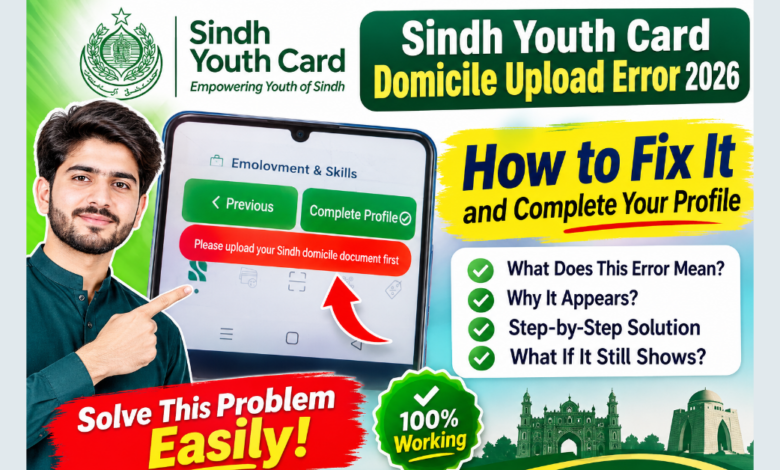
Are you trying to complete your Sindh Youth Card registration but seeing the message “Please upload your Sindh domicile document first”? Don’t worry. This message indicates that your domicile document has not yet been uploaded or recognized by the application.
The Sindh Youth Card registration process requires eligible applicants to provide information and supporting documents for verification. If you reach the Employment & Skills section and cannot complete your profile, checking your domicile document upload is an important first step.
In this guide, you will learn what this error means, why it appears, how to upload your Sindh domicile document, and what to do if the problem continues.
What Does the Sindh Youth Card Domicile Upload Error Mean?
The message “Please upload your Sindh domicile document first” appears when the application requires a Sindh domicile document before allowing you to proceed.
A domicile certificate is an important document that establishes a person’s permanent residential connection with a particular province or district.
Since the Sindh Youth Card is designed for eligible young people belonging to Sindh, applicants need to provide proof of their Sindh residency.
If the domicile document has not been uploaded, the application may prevent you from completing the remaining profile sections.
Why Is the Sindh Youth Card Asking for a Domicile Document?
There are several possible reasons why you may see this message:
- Domicile document not uploaded: You have completed other profile sections but have not uploaded your domicile certificate.
- Document upload incomplete: The upload process may not have finished successfully.
- Wrong document selected: You may have selected a document other than your Sindh domicile certificate.
- Internet connection problem: A weak internet connection may interrupt the document upload.
- Application issue: The application may not have updated your profile after uploading the document.
Check your uploaded documents before attempting to complete the profile again.
How to Upload Your Sindh Domicile Document
Follow these steps to resolve the domicile upload message.
Step 1: Open the Sindh Youth Card Application
Open the Sindh Youth Card mobile application on your smartphone.
Log in using your registered account details and navigate to your profile.
Step 2: Find the Document Upload Section
Look for the personal information or document upload section in your profile.
Check whether an option is available for uploading your Sindh domicile certificate.
Step 3: Select Your Sindh Domicile Document
Choose a clear digital image or scanned copy of your original Sindh domicile certificate.
Make sure that the document is readable and all important information is visible.
Step 4: Upload the Document
Select the appropriate document and follow the application’s upload instructions.
Wait until the upload process finishes. Do not close the application while the document is uploading.
Step 5: Check Your Profile Again
After uploading the domicile document, return to your profile.
Check whether the document appears as uploaded or submitted. Then try completing your profile again.
Important: The exact accepted file formats, file size limits, and verification time should be checked inside the official application. Do not assume that every image or PDF format will be accepted.
What If the Sindh Youth Card Domicile Error Still Appears?
If you have already uploaded your domicile certificate but the same message continues to appear, try these troubleshooting methods:
- Check your internet connection.
- Close and reopen the mobile application.
- Log out and log in again.
- Check whether the domicile document is visible in your uploaded documents.
- Make sure the uploaded document is clear and readable.
- Update the application if a newer version is available.
- Contact the official Sindh Youth Card support team if the problem continues.
Avoid uploading multiple incorrect documents or creating duplicate accounts to bypass the error.
Can I Complete My Sindh Youth Card Profile Without a Domicile?
According to the programme’s eligibility information, a Sindh domicile is an important requirement for applicants.
The application message shown in the screenshot also indicates that the domicile document must be uploaded before proceeding with the profile completion process.
Therefore, applicants who do not have a Sindh domicile should check their eligibility and contact the relevant authorities for guidance rather than uploading an unrelated document.
Important Documents to Keep Ready
Before continuing your Sindh Youth Card registration, keep your relevant identification and supporting documents ready.
These may include:
- CNIC or B-Form, as applicable.
- Sindh domicile certificate.
- Parent or guardian identification details, where required.
- Other supporting information requested by the official application.
Always follow the latest instructions displayed in the official Sindh Youth Card application.
Conclusion
The Sindh Youth Card domicile upload error is a message indicating that the application requires your Sindh domicile document before you can proceed.
To resolve the issue, open your profile, find the document upload section, upload a clear copy of your Sindh domicile certificate, and check your profile again.
If the message continues after a successful upload, try restarting the application or contact the official support team for assistance.
Make sure you use the official Sindh Youth Card platform and never share your CNIC, OTP, or personal documents with unknown websites or individuals.
Frequently Asked Questions (FAQs)
Why does Sindh Youth Card show “Please upload your Sindh domicile document first”?
This message appears when the application requires your Sindh domicile document before allowing you to complete your profile.
How can I fix the Sindh Youth Card domicile upload error?
Open your profile, navigate to the document upload section, upload your Sindh domicile certificate, and check whether the document has been successfully submitted.
Is Sindh domicile required for the Youth Card?
Yes. Sindh domicile is an important eligibility requirement for the Sindh Youth Card programme.
Can I upload a picture of my domicile certificate?
Use a clear digital copy of your certificate and follow the file-format and upload instructions provided by the official application.
What should I do if my domicile document is not uploading?
Check your internet connection, confirm that the document is readable, restart the application, and try again. Contact official support if the issue continues.